Home
Menu
Please help support us Tell friends and colleagues about our apps!


100 Series Concrete masonry - Mouse over Labels for descriptions.
Courses 800 doors on bond 800 doors on corner
800 doors on wall end 900 hall door-tops 1000 hall door-tops
Squint corners 600 doors 700 doors
1200 doors 800 doors on edge 800 door in 1100 dogleg
800 door in 1200 dogleg 800 door in 1000 return 700 dogleg
500 dogleg 500 return 300 nib


Edit Show Settings How does the bond work for doors?


Keyboard: Right Arrow = Add Segment. Left Arrow = Delete Segment. Down Arrow = New Wall
?
Click to add a new wall. each wall can have 1 or more segments. If the wall comes to a corner and goes on, click the arrow and add the next segment. Continue until the wall ends, then click New Wall and enter the next wall
Next Wall


?
Show or hide any Miscellaneous entries
Edit  Show Miscellaneous


UpBack To Top
100 Estimator will calculate the quantity of 100 Series Blocks in a standard building. Work out which wall you'll build first. Start at the beginning and enter the length to the next corner, or the end of the wall. If it's the end, click Next Wall. If it's a corner click Add to add the next segment of this wall. Continue until the wall ends. To remove segments of a wall click Delete

When all the walls are entered correctly, select the height of the walls, number of doors, doglegs etc in the total of the building from the dropdown lists.
Each different possibility for a door's location (on bond -on corner etc) will result in different types of blocks used. e.g. for doors on corners, there's corners and halves and corner halves. Make sure all the doors in the structure are accounted for in the list, and any dog legs etc are listed.

Enter any miscellaneous entries by clicking Edit show Miscellaneous. When all the measurements are correctly entered click Calculate Quantities The page will reload with he results. You can edit the data used to calculate cement, loam etc in the edit boxes at top right. These are pre-set to standard values.


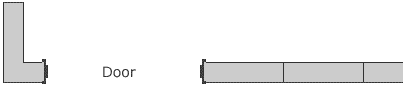
100 Series Concrete Block - 800mm steel door frame bond

Door on corner return. Corner returns + Corner return halves, (or halves and quarters) to corner side, stretchers + halves to other side


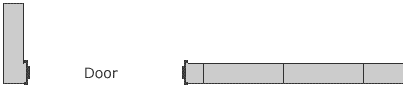
100 Series Door on Edge
Door on edge of corner - No corner return. Stretchers + halves to corner side, Jamb blocks or cuts to other


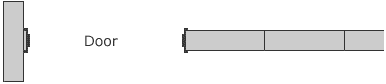
100 Series Door on End
Door on end of wall, buts into passing wall. Jamb blocks or cuts


100 Series Door on Bond
Door on bond. Stretchers + halves each side

?
If you need to take full scale measurements directly from your monitor, adjust the size of the diagrams on screen to match a ruler. Does not affect printed sizes. Use keyboard Cursor Keys to fine tune as you adjust scale.
Adjust scale of diagrams to measure 100% scale on screen with a ruler.

Tap to Transfer this page to Phone via

All Inch inputs and dimensions are actual physical finished sizes
?
Select output Fraction Precision then Re-Calculate to display.
Fraction Precision
Lumber
?
Selected value is automatically copied to clipboard. Select then Paste into text box.
Prec…


0


Built something using our calculators?   Please Send Photos!
and a description for our Examples list.

(diagrams on this page)

How to Print Large Templates over multiple pages.
If you're cutting blocks, concrete, stone or ANYTHING and there's DUST - DON'T TAKE THE RISK
Don't cut it, or cut it wet so there's NO DUST - Silicosis Sucks
And if you're cutting wet, wear a mask - there's dust in the spray mist too!


How should we spell it?
Results


Many of our calculators can be used for multiple purposes.
If you find a use for a particular calculator in a field not directly related to the name or description of the calculator, or have suggestions for new calculators or improvements to existing ones, Please Let us Know!
Next Calculator ? LET US KNOW !

And if you find the site useful, please Tell a Friend!

If you've benefited from this free service please consider supporting
Blue Dragon Children's Foundation


blocklayer.com logo

Reviews and Examples

?
Create PDF with all diagrams on this page for printing


App Directory

X Remove This Margin

Built something using this site?
Please Send Photos!
and description.


Calculator


Print Help Help


? Copy all diagrams on this page to bottom of page - Make multiple copies to Print or Compare Results Compare Diagrams


Share Print this Page


X Remove This Margin

Please help us support
Blue Dragon
Children's Foundation

Blue Dragon Childrens's Foundation

Reviews and Examples
Contact Us

blocklayer.com logo

Online Calculators and Printable Full Scale Template Generators for
Construction - DIY - Remodeling - Metalwork - Crafts - Automotive - Mechanical

All calculators on this site are geometric only.
Check relevant local regulations for appropriate sizes, spacings and all engineering requirements.


Terms of Service & Disclaimer  |  Privacy & Cookie Policy

Copyright © 1979 - 2026 Greg Tarrant - blocklayer.com